???NZXT H7 Flow RGB: The Airflow Beast Every Gamer Needs???
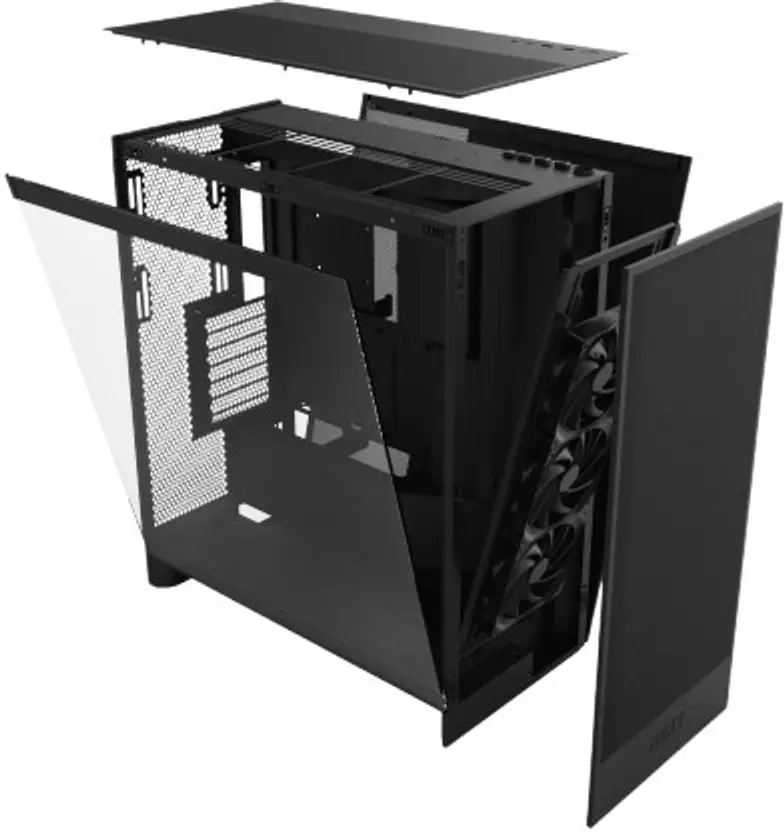
??? What the H7 Flow RGB Does Very Well
??? Excellent Cooling & Airflow Design
- The H7 Flow RGB emphasizes airflow: its perforated mesh-heavy design (front and top) helps the case ???breathe,??? allowing good intake/exhaust airflow even before you add extra fans. KitGuru+2Tom's Hardware+2
- Even with the included fans, reviewers found thermal performance strong ??? the standard fans (though not massive) moved air efficiently. Tom's Hardware+2Custom PC+2
- For builds using liquid cooling, the case supports large radiators: front up to 420 mm and top up to 360 mm (depending on the version), giving good flexibility for high-end cooling setups. varsai.ae+2support.nzxt.com+2
??? Spacious, Flexible Interior & Component Compatibility
- Supports a wide range of motherboard sizes: from Mini-ITX all the way up to E-ATX (up to 277 mm wide) ??? so you???re not limited when choosing a board. support.nzxt.com+1
- GPU clearance is generous (up to 410 mm), and you get good CPU-cooler compatibility (up to ~185 mm height). support.nzxt.com+1
- PSU space (up to ~200 mm) and plenty of cable-management space (~34.5 mm behind the motherboard tray) help builders keep wiring neat, which improves airflow and makes the build clean and professional-looking. support.nzxt.com+2KitGuru+2
??? Build Quality, Ease of Build & Practical Features
- Build experience is smooth: tool-less access panels, well thought-out interior layout, easy cable routing, and clean finishing make it beginner-freindly yet satisfying for enthusiasts. Tom's Hardware+2XDA Developers+2
- The design (steel frame + tempered glass side panel) gives a premium, modern look ??? good for those who want a clean, polished build instead of a cramped budget-case vibe. support.nzxt.com+1
- There???s good support for both air-cooled and water-cooled builds ??? giving flexibility depending on what hardware you want inside. Custom PC+1
?????? Where It Might Disappoint / Things to Know Before Buying
??? Included Fans & RGB Control Are Limited
- Some reviewers point out that although it???s branded ???RGB,??? the case doesn???t always come with an RGB controller; the bundled fans may use a 3-pin 5 V ARGB header, which not all motherboards support, so you might need to buy an additional controller or compatible header. Reddit+1
- In ???stock??? form (with only the included fans), airflow is good ??? but pushing for maximum airflow (or powerful hardware) may require adding more fans or better cooling components. Custom PC+2KitGuru+2
??? Dust Filtering & Panel Setup Could Be Better
- Because the front/top are heavily perforated for airflow, dust filtration is not as robust as in some ???mesh + filter??? cases. Some reviews consider this a design trade-off that leads to dust buildup unless you clean regularly. KitGuru+1
- The case is large and tall ??? which gives space, but means it might not fit well in all desks or small rooms. If you have a compact setup, this could be a bit bulky. KitGuru+1
??? Lacks Some ???Extra??? Features Some Builders Want
- It doesn???t offer vertical-GPU mounting by default (vertical slot count = 0) ??? something enthusiasts sometimes look for when building ???showpiece??? rigs. support.nzxt.com+1
- The internal space behind the motherboard, while good for cable management, isn???t huge ??? so very large cable bundles or unusual PSU cables might still be a tight fit. Tom's Hardware+1
???? Who Should (And Should Not) Go For H7 Flow RGB
Ideal for:
- Gamers or power-users building a mid-to-high-end PC with a large GPU and/or water cooling.
- People who care about a clean, tidy build with good cable management and modern looks.
- Builders who want upgrade-flexibility ??? room for bigger motherboards, longer GPUs, more fans or radiators.
- Those who???re comfortable adding a few extra fans or fan controllers if needed (to get the most out of cooling/RGB).
Maybe skip (or think twice) if:
- You want a compact build for a small desk or limited space.
- You dislike regular maintenance ??? if airflow is high, you???ll likely get dust buildup unless you clean often.
- You're looking for a ???ready to go with maximum lighting and features??? ??? you may need to buy extra fans, RGB controller, or filters to get there.
???? Final Thoughts
The H7 Flow RGB remains one of the more balanced mid-tower PC cases ??? it mixes good airflow, flexibility, build quality and expandability at a price point that???s reasonable for what you get. It might not be the ???flashiest??? or most feature-packed case out there, but for a no-nonsense, serious build (gaming PC, workstation, content creation rig), it hits the sweet spot between performance, price, and practicality.